Skip to content
OmniMint
Menu

BUILT FOR REGISTERED INVESTMENT ADVISORS

More time for clients. Less work between systems.

Choose a page in the workspace to see how it works.
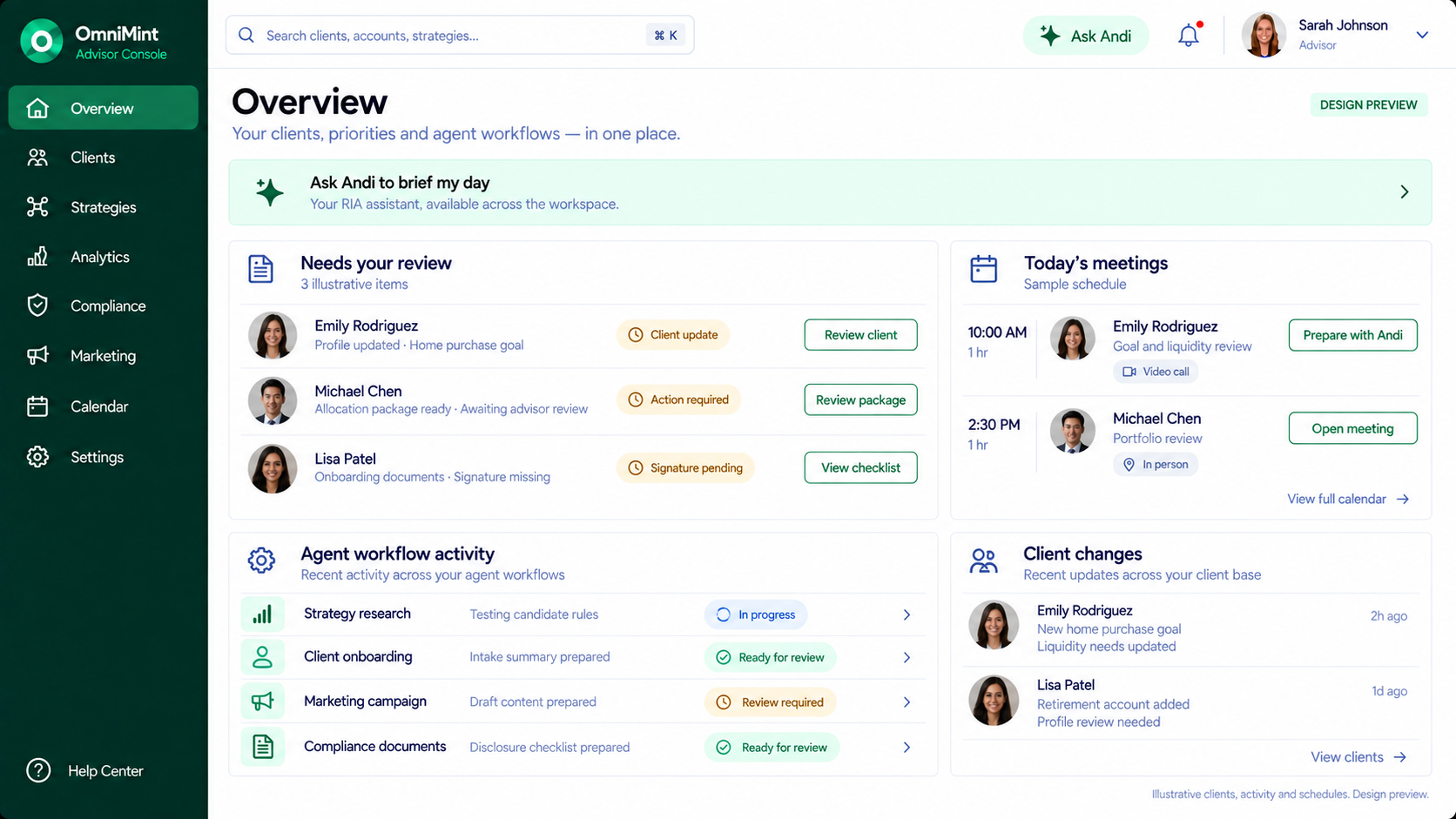
OmniMint Advisor Workspace
Advisor Overview with client review queue, meetings, agent workflow activity and profile changes; illustrative data.
Product preview · illustrative data. Required reviews follow your firm’s authorized roles.
View full-size screen ↗

OmniMint is being built to help RIA teams move client updates, strategy research, compliance reviews and marketing forward in one workspace—so your people can spend less time coordinating work and more time serving clients.

  • Reduce repeated handoffs. Keep next actions visible.
  • Keep your firm’s judgment and approvals in control.

Ask Andi is your practice assistant, across every page and in its own workspace. Illustrative preview · sample data and agent responses.

WHAT CHANGES FOR YOUR FIRM

Make room for the work only you can do.

01 / CLIENT SERVICE

Spend less time chasing the next step.

Keep changing goals, missing documents and follow-ups together, so your team can focus on the client conversation.

02 / TEAM CAPACITY

Move work without repeating it.

Bring preparation, evidence and reviews into a shared workflow, with fewer spreadsheets and email handoffs to coordinate.

03 / OVERSIGHT

Know what needs your judgment.

See proposed changes, supporting sources and approval history before your firm takes the next action.

These are the outcomes we’re building toward. Product screens are illustrative previews, not measured customer results.

A CLEAR STARTING POINT

Start with your firm’s needs.

Meet the people building it.

Matthew Andrews, Founder & CTO, and Christopher Ray, Co-founder & CPO, bring experience in software, financial technology and product delivery.

Meet the founders ↗

Understand where it fits.

We’ll discuss the workflows you want to improve and which tools you need to keep. Integration and replacement scope should be clear before you commit.

Talk through availability and cost.

We’ll discuss product availability, pricing and fit directly. No client data or payment is needed to start the conversation.

01 / Customer updates

Make every life update a clear next step.

See what changed, review the proposed allocation and send it to your client for approval.

Seen enough?
Read the walkthrough
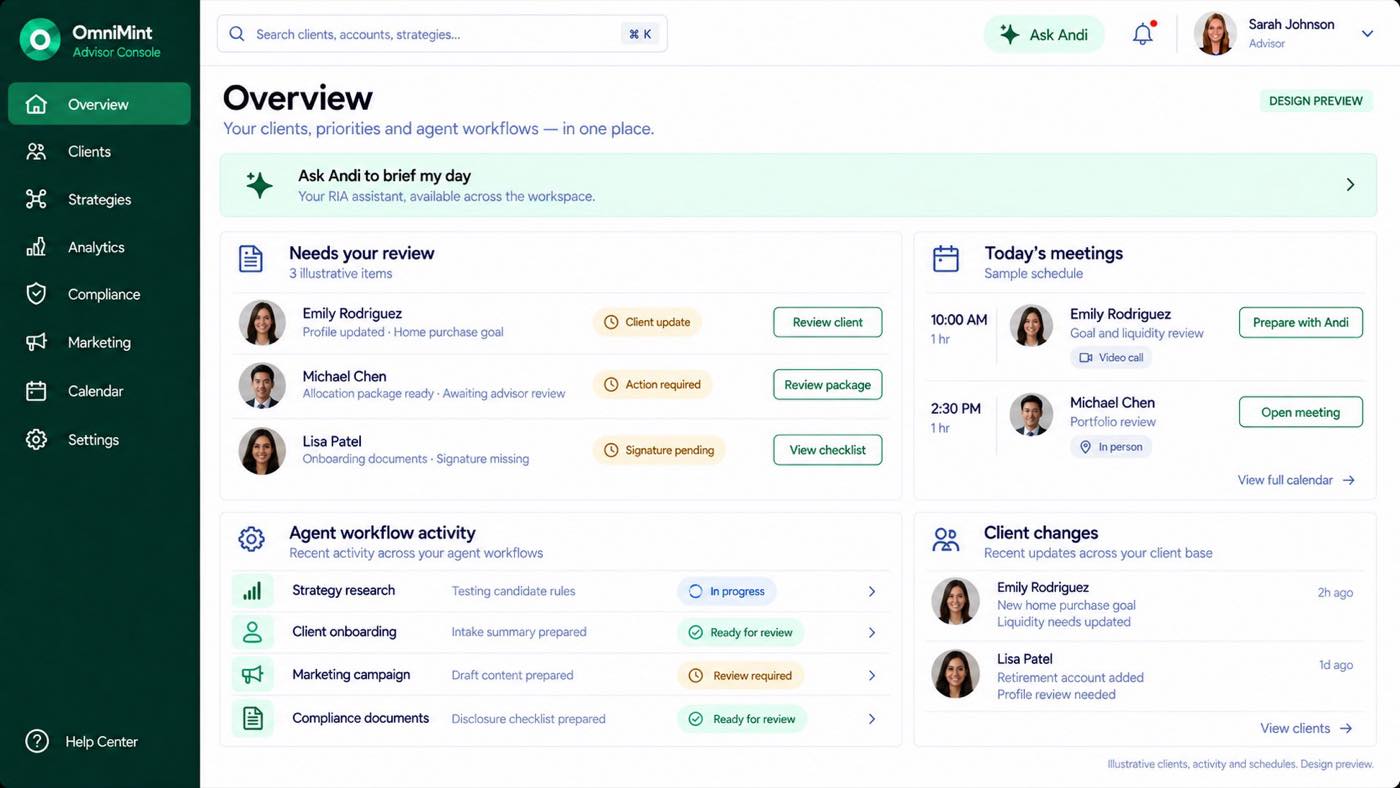
  1. Emily is buying a home. OmniMint flags her updated goals for her advisor's review.
  2. Her advisor opens Emily's profile to see her timeline, cash needs, and what has changed.
  3. The Allocator prepares a tailored package. Her advisor compares the changes, and can adjust, rerun, or keep the current allocation.
  4. Send the proposal by email and in the app, so Emily can review the changes and required disclosures.
  5. The request is sent. Emily's approval is still pending; no trades have been authorized.
  6. The review closes, and Emily moves to Awaiting client response. Her current allocation stays active until the required approvals are complete.
OmniMint · Customer updates
Overview flags Emily’s allocation for review.
Illustrative product previewView full-size screen ↗

YOUR TIME BELONGS WITH YOUR CLIENTS

How much of your day goes into keeping your tools in sync?

Client details in your CRM? Intake answers in forms? Research in spreadsheets? Compliance reviews in email? Campaigns in another platform?

How many subscriptions are you paying for? What is that costing you a year?

You’re moving information between tools when you could be moving your firm forward.

Bring it together with OmniMint.

One workspace for your clients, strategies, compliance and marketing—with specialized agents helping move the work forward and your firm staying in control.

Tell us where the disconnects are. We’ll discuss how OmniMint could fit your practice.

OmniMint

Clients

CRM · Forms · Onboarding

Strategies

Research · Testing · Analytics

Compliance

Documents · Reviews · History

Marketing

Content · Campaigns · Reporting

Ask Andi

Understand the work. Guide what happens next.

Meetings & follow-ups connected throughout

RIA workspace with individual IAR software seats. Software access does not confer a professional license or regulatory registration. Required review and approvals remain in place.

02 / Strategy creation

Your strategy. Built, tested, reviewed.

Set the direction. Follow specialized agents from trading rules to tested results—and decide what enters your library.

Seen enough?
Read the walkthrough
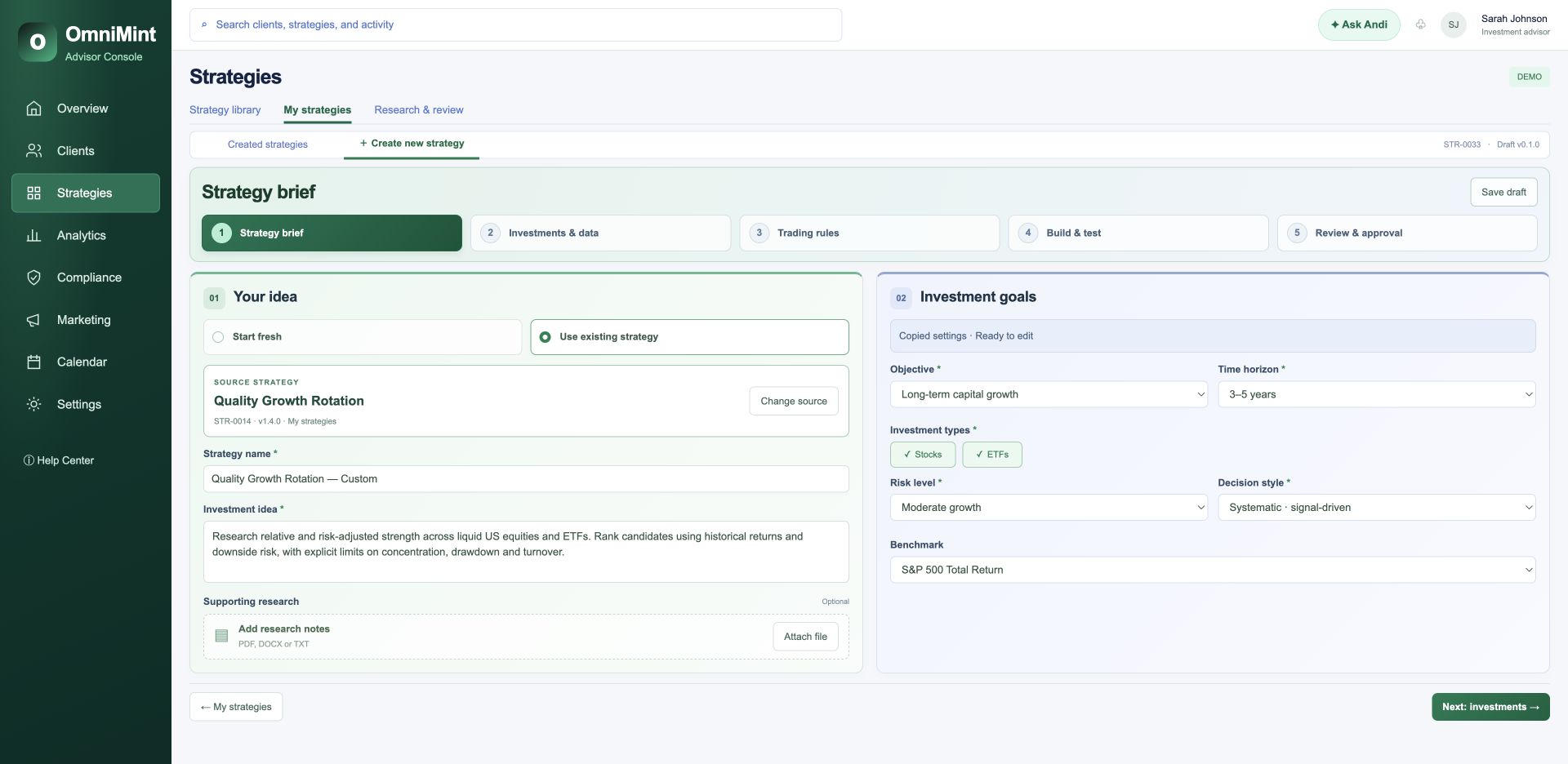
  1. Sarah starts with the strategy brief, defining its purpose, objectives, and risk approach.
  2. She selects investments and reviews their characteristics, market history, and benchmarks before moving forward.
  3. Next, she defines what triggers a trade, how positions are sized, and the limits the strategy must follow.
  4. Specialized agents prepare the data, build and compare candidates, and test their behavior. Progress and results stay visible.
  5. Sarah can review the whole strategy in one place: eligible investments, example holdings, trade triggers, position sizes, and limits. She checks the test results against those choices. Here, three data findings need attention before she can request qualification.
  6. Review data fixes shows exactly what needs correcting: missing prices, adjustment evidence, and the dataset version. Sarah can inspect each finding before applying the fixes and rerunning. Her investment choices and trading rules stay unchanged.
  7. The Data agent completes the repairs. The Builder reruns the tests, and the Research auditor checks the evidence. Sarah can follow each step or keep working while the run continues. Updated results become available when the checks finish.
  8. Sarah compares the corrected run with the original and the benchmark, then checks risk, turnover, holdings, and resolved findings. Corrections can change results in either direction. These figures are illustrative. She returns to the strategy review before requesting qualification.
  9. Qualification checks the strategy's data, trading limits, and robustness. The workflow also screens potential client fits against risk, objectives, and liquidity needs. These are simulations. They do not change anyone's portfolio.
  10. Twelve profiles were screened. Three show a potential fit, seven do not, and two need updated information. Sarah can inspect each result and its simulated weight. A potential fit is a starting point for review, not permission to allocate.
  11. The strategy has passed its checks, but human approval is still required. Sarah runs a single-member R I A, and her account holds the Approver role. That permission lets her approve this version. Other firms use their designated authorized Approver.
  12. Approval is recorded, and this strategy version is now available for recommendations. Sarah can reopen its rules, holdings, results, and approval history. Next, she reviews potential client fits individually. Library approval does not move client funds; each package follows its own review and client approval.
  13. Each client proposal follows a separate review, client approval, and required disclosures before deployment.
  14. If validation finds a problem, the result explains the required fix. Client-fit screening waits until the strategy is corrected and checked again.
OmniMint · Strategy creation
Define the strategy — approved OmniMint strategy console; illustrative data.
Illustrative strategy performance and client profiles. No trades or allocations are executed.View full-size screen ↗

PREPARED BY AGENTS. DIRECTED BY YOU.

Less chasing work.
More informed decisions.

See what’s happening.

Follow each agent’s progress, findings and next steps across your workspace.

Keep your judgment central.

Review prepared work and required approvals before the next action.

Return to the record.

Trace the conversation, supporting evidence and decisions behind the work.

03 / Compliance

See the issue. Review the fix. Keep the record.

Follow compliance checks across your firm. Inspect the evidence, review agent-prepared corrections and see what still needs action.

Seen enough?
Read the walkthrough
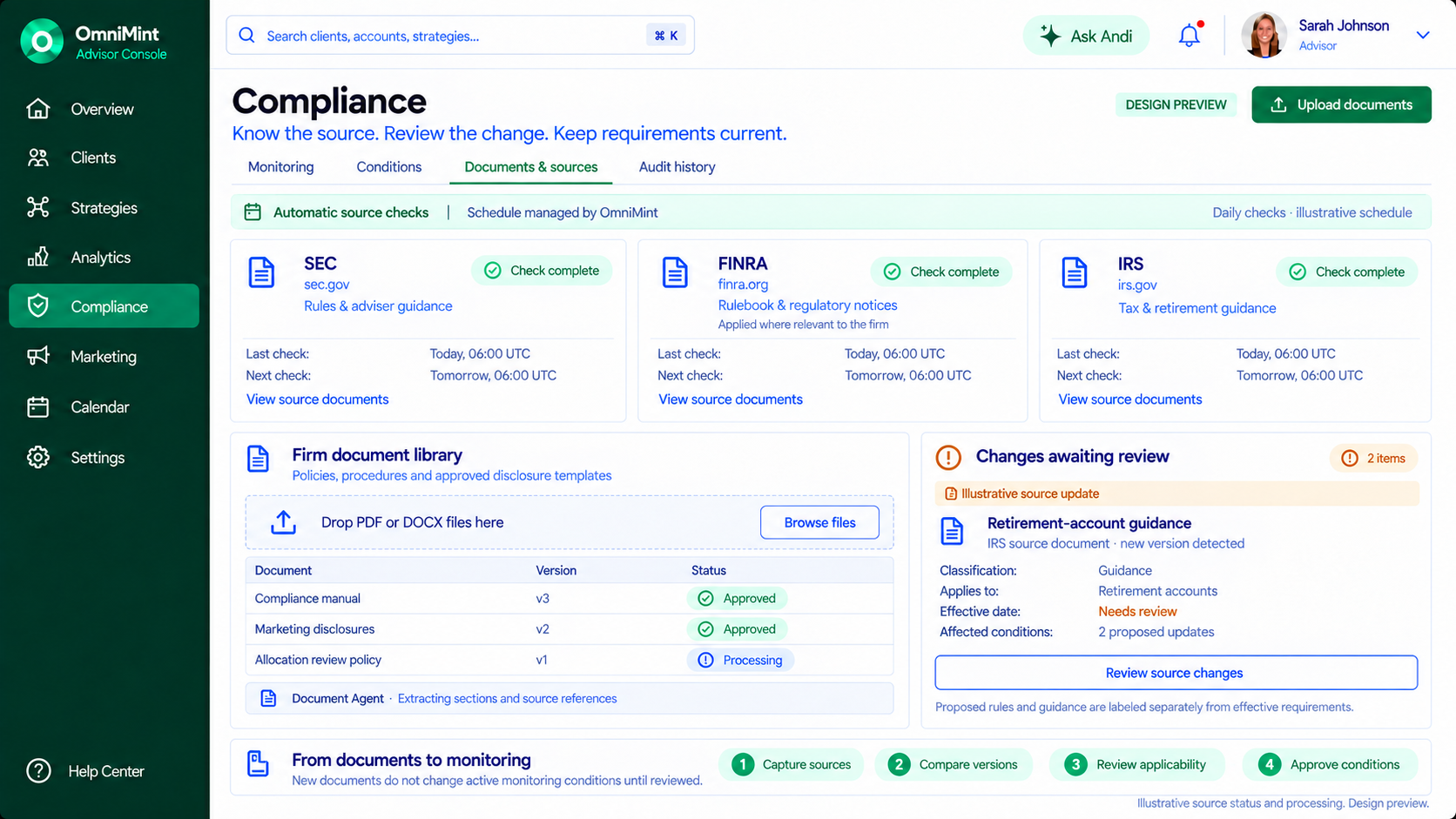
  1. OmniMint starts with your firm's documents and scheduled regulatory source checks.
  2. Potential issues appear in one review queue.
  3. Open an allocation finding to inspect the supporting evidence.
  4. If no issue is found, record your reasoning and close it.
  5. Next, review a campaign's missing disclosure.
  6. Specialist agents prepare a correction, with their work visible.
  7. You approve the exact change before checks run again.
  8. The disclosure is resolved; the campaign remains unpublished.
  9. For a missing signature, send the client a secure request.
  10. Its status changes to awaiting client, with every decision preserved for review.
OmniMint · Compliance
Documents & sources — approved OmniMint compliance console; illustrative data.
Illustrative workflow and sample findings. No messages are sent or client records changed.View full-size screen ↗

04 / Marketing

Your campaign. Coordinated by Andi. Approved by you.

Turn your goals into prepared campaigns. Ask Andi coordinates specialized agents, keeps their work visible and brings the decisions back to you.

Seen enough?
Read the walkthrough
  1. Start in Marketing. See your campaigns, performance, and agent activity in one place.
  2. Tell Andi your campaign goal. Your conversation becomes an editable brief, with the work taking shape beside you.
  3. Choose your audience and channels. Andi carries those choices into the campaign.
  4. Choose images from your library, or upload your own. Creative, Copy, and Compliance agents prepare the content for each channel.
  5. Review the copy, designs, checks, and timing. You approve the campaign before anything is scheduled.
  6. Your campaign is scheduled. The approval, conversation, and agent activity stay recorded together.
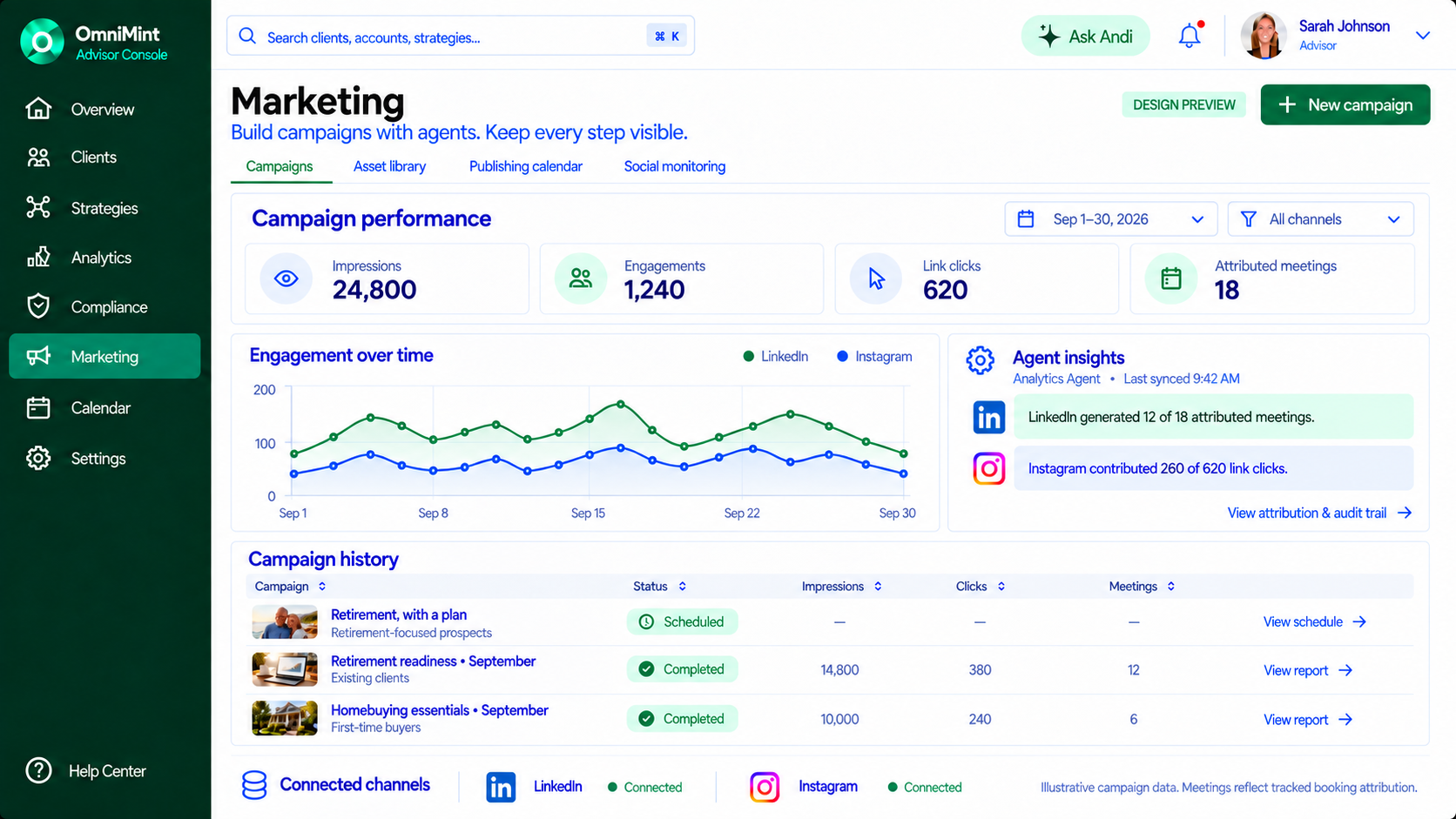
  7. Back in Marketing, track your scheduled campaign alongside past performance and agent insights. Join the waitlist today.
OmniMint · Marketing
One campaign. One connected workflow. — approved OmniMint marketing console; illustrative data.
Illustrative campaign and historical metrics. Nothing is published or sent.View full-size screen ↗

Bring your team’s next chapter into focus.

OmniMint

Let’s talk about your firm.

Tell us where work gets stuck. We’ll discuss fit, availability and pricing with you. No client data or payment needed.

Fields marked * are required.

What would you most like to improve?

Select all that apply.

We’ll use your details to respond to your request. Read our Privacy Policy (opens in a new tab).

Your inquiry goes to product@omnimint.dev. No waitlist enrollment or payment.